Digital transport passport
One QR code instead of a folder of documents. An electronic document in the Smart Cargo mobile app that accompanies the shipment all the way and replaces the paper checkpoint sheet.
All documents in one QR code
Declarations, SNT, e-invoices, e-consignment notes and advance notifications are all linked to one QR code of the digital passport. Nothing has to be uploaded manually.
Real-time statuses
The cargo owner and the carrier see which checkpoint the vehicle is at, which clearance stage it is in and where it is on the route — based on roadside camera data.
Login with a digital signature
Authorisation via eGov Mobile with a digital signature. Documents are pulled from official systems automatically.
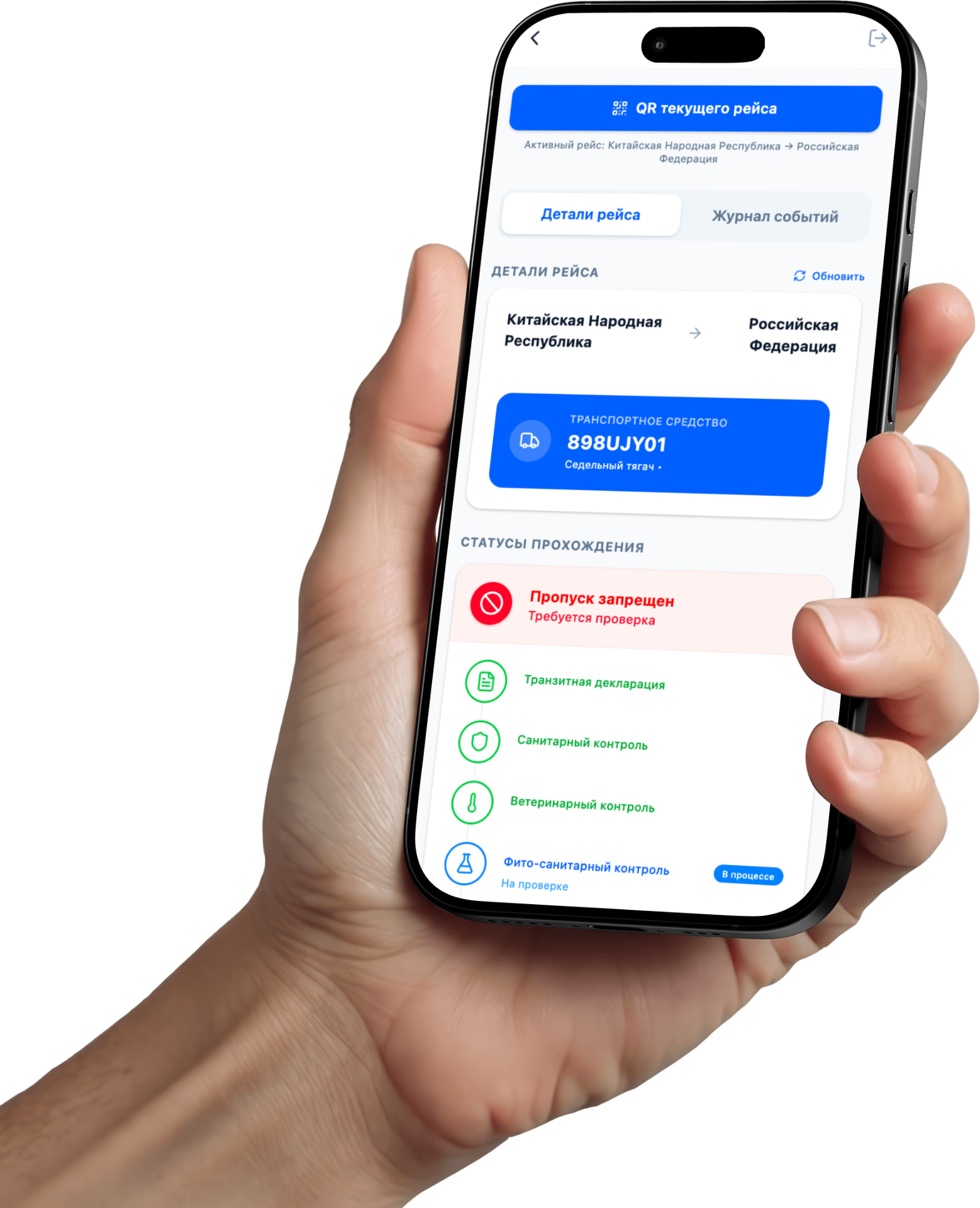
One QR = all documents
For carriers and cargo owners
If your drivers cross the Kazakhstan border through the Nur Zholy checkpoint, prepare them for the launch in advance. At this stage the use is voluntary, but vehicles with a digital passport pass the checkpoint faster.
What to do before 1 May 2026:
- Send your drivers a link to this page or the QR code of the leaflet
- Make sure every driver has eGov Mobile installed with an active digital signature
- Explain to the driver which scenario to create — entry or exit
- Ask the driver to download the Smart Cargo app and sign in in advance
Before / After
- A folder of documents
- A paper checkpoint sheet
- Proving that documents are genuine
- Presenting documents manually at every stage
- One QR code in the Smart Cargo app
- Verification in seconds
- Documents from official databases — verified at the source
- The cargo owner sees the vehicle in real time
- Documents and advance notifications are pulled automatically — the driver uploads nothing
Two ways to use the digital passport
Entering Kazakhstan
The driver creates a digital passport for entry — specifying the vehicle and the direction. Nothing else is required. As soon as an advance notification or a goods declaration for that vehicle appears in the Keden system, it is linked to the passport automatically. The driver sees all statuses in the app and crosses the border with the QR code.
Leaving Kazakhstan
The driver creates a digital passport for exit and selects their current electronic queue from the CarGoRuqsat list — it is linked to the passport automatically. Shipment documents are pulled from government systems. The driver crosses the border with the QR code.
In both scenarios the driver does not upload any documents manually. Everything is generated automatically from the Keden, EAEU and CarGoRuqsat systems.
Driver instructions
5 steps to crossing the border with a digital passport. Choose your direction:
Download the Smart Cargo app
Google Play for Android is available via the link on this page. Install it on the phone you take on the trip.
Sign in via eGov Mobile
Open Smart Cargo → sign in via eGov Mobile with your digital signature. eGov Mobile must be on the same phone.
Create a digital passport for entry
In the app select "Entering Kazakhstan" → enter the vehicle number and the direction. Nothing else is required.
Wait for documents to be linked automatically
As soon as the declarant submits an advance notification or a declaration for your vehicle in Keden, the documents will appear in the passport by themselves. You will see the statuses in the app.
Show the QR code at the border
At the Nur Zholy checkpoint the inspector scans the QR code from your app. No paper checkpoint sheets.
eGov Mobile must be installed on the same phone
Without eGov Mobile and an active digital signature, signing in to Smart Cargo is not possible.
How it works
The full process from installation to crossing the border
Contents
Use cases
Border / customs and border checkpoint
The QR code replaces the paper checkpoint sheet. From 1 May 2026 at the Nur Zholy checkpoint.
International transport across Kazakhstan
Inspectors see the digital status of the cargo's legality without paper checks.
Transport within the EAEU (tax control)
The State Revenue Committee checks the SNT: the document exists and is correct — without a manual search.
Domestic transport within Kazakhstan
Quick access to electronic documents and trip data.
Who it is for
Driver / carrier
Easier checks, less paperwork
Supervisory authorities
Transparency and source-based verification
Inspection / State Revenue Committee
Fast control and recording
Cargo owner / shipper
Sees the location and shipment status in real time
How it works
The driver downloads the Smart Cargo mobile app
Authorisation via eGov Mobile with a digital signature
eGov Mobile must be installed on the same phone
The driver creates a digital passport and chooses the direction — entry or exit
Automatic data linking
▸ Entry
The system waits for an advance notification or declaration for this vehicle in Keden and links them to the passport automatically
▸ Exit
The driver selects their electronic queue from CarGoRuqsat — it is linked to the passport. Documents are pulled automatically
The inspector scans the QR code and gets confirmation
The document exists · Is valid · Matches the vehicle · Status is current
What is inside the digital passport
The legal basis of the digital passport
The digital passport relies on the current rules for the clearance and control of shipments, as well as on the regulations of the systems that generate the documents and statuses.
FAQ
No, it is used in 4 scenarios: the border, international transport across Kazakhstan, the EAEU (State Revenue Committee/SNT) and domestic transport.
It verifies the presence and validity of documents, their match with the vehicle, and the statuses of procedures.
No. Documents are pulled automatically from government systems. On entry — as soon as the data appears in Keden. On exit — after the electronic queue is selected from CarGoRuqsat.
From 1 May 2026 at the Nur Zholy checkpoint. Use is voluntary.
Not at this stage. But vehicles with a digital passport pass the checkpoint faster.
Via eGov Mobile with a digital signature. eGov Mobile must be installed on the same phone.
Create a digital passport for entry in advance. As soon as the declarant submits it in Keden, the data will appear in your passport automatically.
Check your registration in CarGoRuqsat and whether the queue is active. Refresh the list or contact the promoter at the checkpoint.
It is currently available on Google Play. The App Store version will be published later.